
Build any discount & bundle logic your client wants.
Custom sections, custom blocks, exactly like the Figma design. Native Bundles is the engine underneath: discount tiers, a cleanly merged line item in checkout, correct splitting in fulfillment. Your entire integration is one line-item property.
Live at Skinbro, otinga, SugarShape and Naturbummler. Plus 25% recurring commission on every store you bring.
In the video: integration via line-item properties, Ready Functions, goodies, Custom Functions and the checkout result.
Free forever on development stores.
Install the app(opens in a new tab)







The client describes their bundle. You already know no app does it that way.
Five sentences from almost every bundle project. You have probably heard all of them.
- Logic
The tier structure that fits the client's catalogue isn't offered by any app in the store.
- Design
The widget ships its own markup. You bend it with CSS and still explain why it doesn't look like the Figma.
- Shopify Plus
Cart Transform would solve it cleanly, but the client is on Shopify Premium, and Plus isn't on the table.
- Your own app
So you'd build your own functions app: deploys, API versioning and maintenance nobody pays you for long-term.
- Afterwards
And every new discount tier comes back to you as a ticket instead of the merchant changing it themselves.
The frontend is yours. The mechanics sit underneath.
Until now it meant hunting for an app that happened to match the logic you needed and came close enough on design, then forcing the rest with CSS. Native Bundles flips that around: you build the surface, the app handles everything below it.
- Your code
Custom frontend in the theme
Your own sections and blocks, exactly to design, in your stack and with your deploy. On add-to-cart you attach one line-item property. That's the integration.
- Native Bundles
The engine behind it
The app reads that property and takes over discounting, Cart Transform and merging, configured in the Shopify admin instead of your code. Changes cost you no billable hours later.
- Checkout
One clean line item
In checkout the bundle shows up as a single merged line. Underneath they're still real individual products, so fulfillment splits them straight back.
You build what the client actually wanted — not whatever a widget happens to ship.
Cart Transform, even when your client isn't on Shopify Plus
Functions like Cart Transform normally require a Plus contract. Through Native Bundles you get them on any plan, as an officially listed public app from the Shopify App Store.
- Cart Transform, Product Discount, Delivery Discount and Payment Customization without a Plus contract
- No custom app to build, no deploys, no API versioning on your side
- The merchant changes the configuration themselves in the admin, no dev ticket per discount tier
One line-item property. That's the entire interface.
A product only gets bundled if it carries the _bundle-id line-item property. You set it in your own add-to-cart, and from there the app takes over. No SDK, no webhook, no dependency in your build.
// The only integration point: one line-item property on add-to-cart.
fetch("/cart/add.js", {
  method: "POST",
  headers: { "Content-Type": "application/json" },
  body: JSON.stringify({
    items: selectedVariants.map((variantId) => ({
      id: variantId,
      quantity: 1,
      properties: {
        // <group>:<instance-id>
        "_bundle-id": "bundle-a:9f3c21",
      },
    })),
  }),
})- group
- Tells the app which bundle this is, so you can run several bundles with different tiers side by side.
- instance-id
- Keeps separate bundles apart in the same cart. Two identical bundles stay two bundles.
Configuring the app itself takes about 15 minutes after that.
Native Bundles live in action
Custom bundle interfaces with Native Bundles as the engine underneath. Not mockups: click through them in the live store.
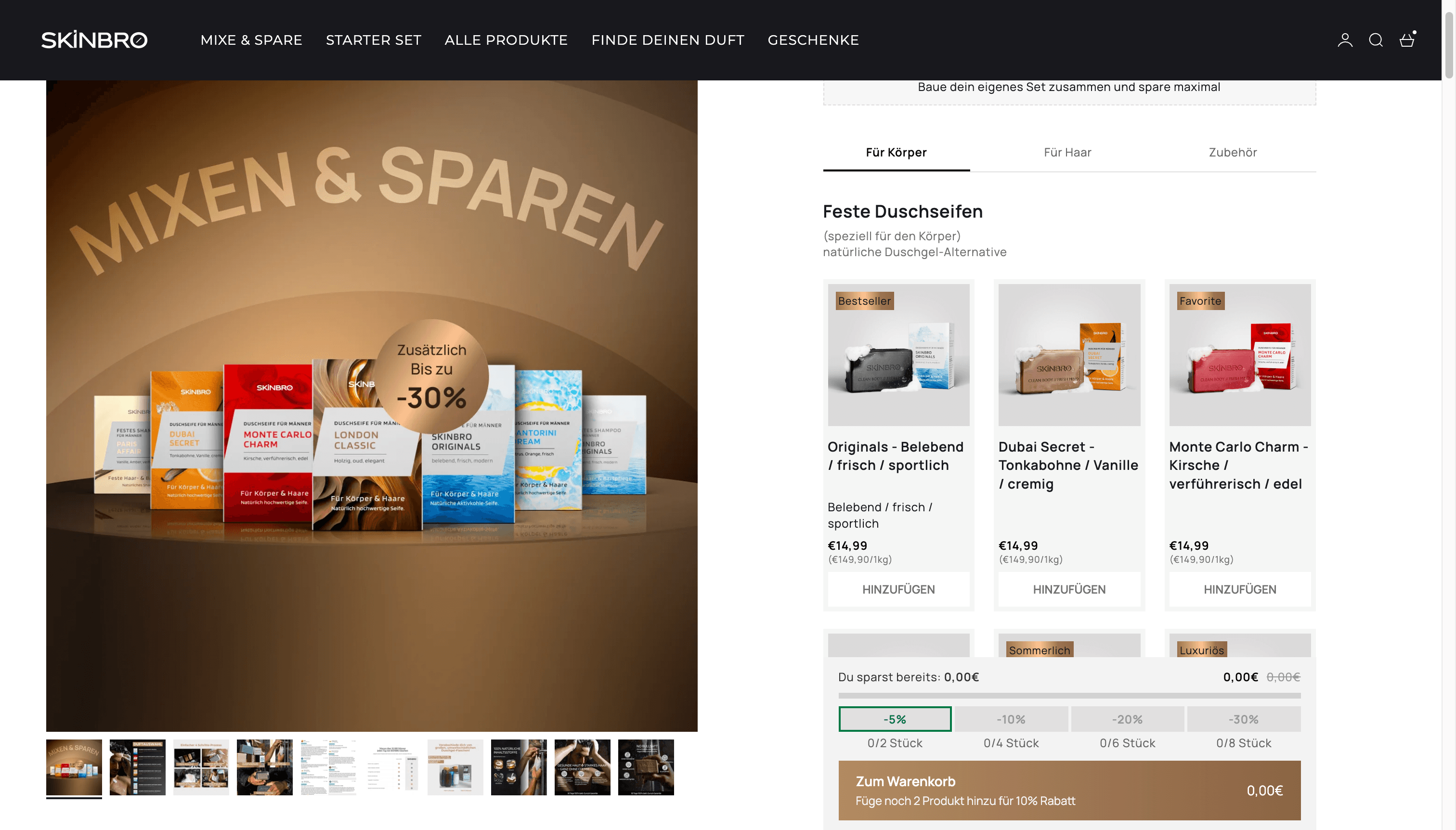
Mix and match across six catalogue areas
A dedicated bundle page with four discount tiers and a running savings indicator. Rendered from a metaobject: the client maintains content, products and discount themselves in the admin.
View live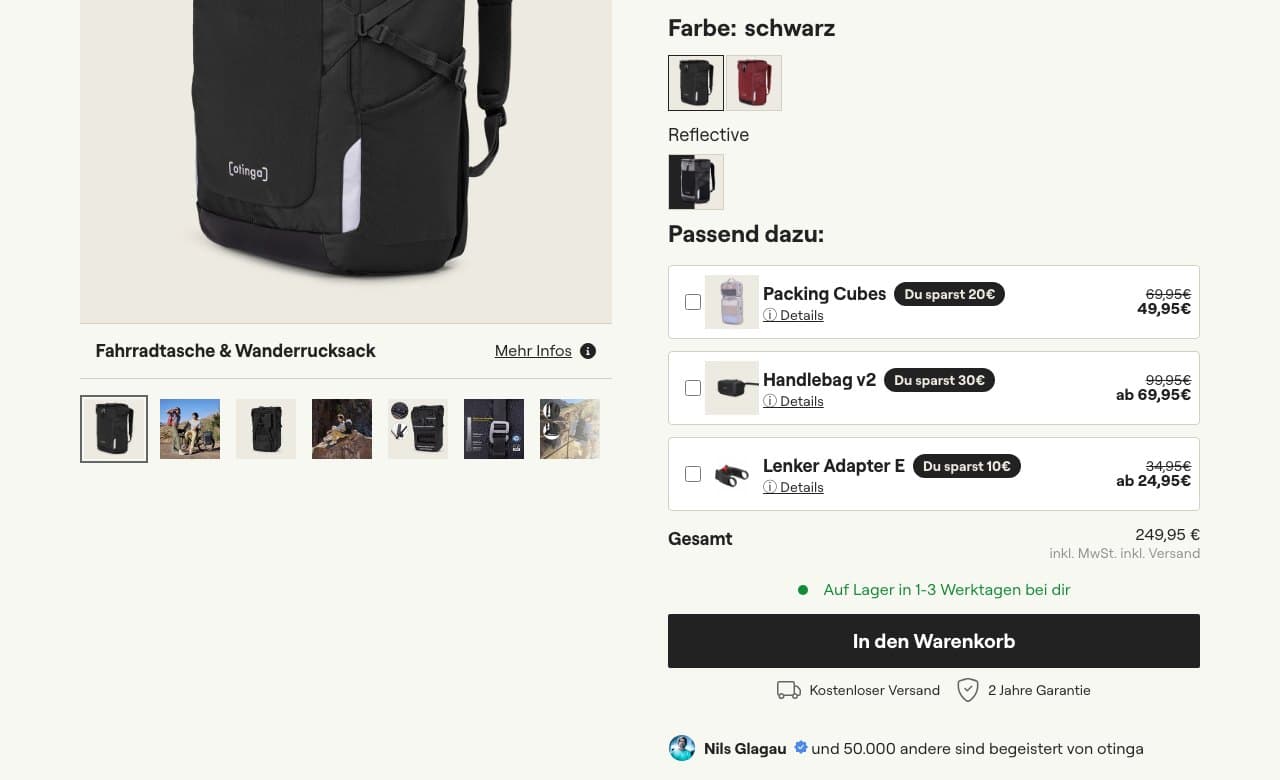
Upsell bundle right on the product page
Accessories as a bundle element under the main product, without breaking the purchase flow. Cleanly A/B tested against the old PDP: +6% AOV, +21% conversion rate.
View live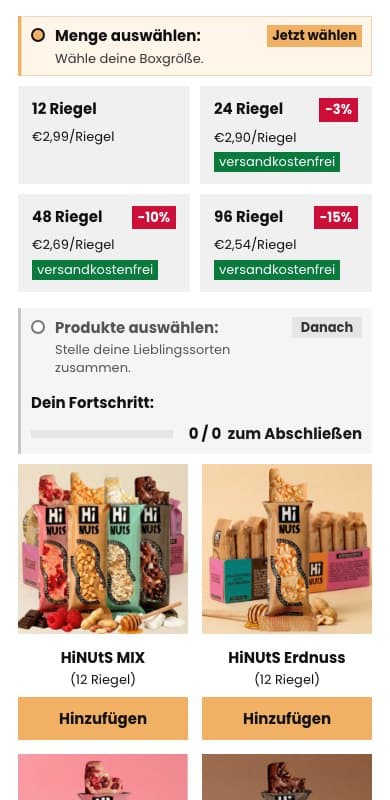
A mix-and-match bundler, cleaned up
Same products, same prices, only the guidance rebuilt. The reworked interface alone added 2 percentage points of conversion rate.
View liveNumbers you can put in front of your client in black and white
Figures from our own projects, each A/B tested against the previous variant rather than estimated.
4–10%
average order value uplift
A/B tested against the previous variant
With upsells where the products genuinely fit together there is often a conversion rate uplift on top. And because all of it is A/B testable, you walk into the follow-up meeting with a result instead of a promise. The best argument for the next project.
You build the project once — and earn every month after
The merchant pays $99 a month, billed straight through the Shopify App Store. A quarter of that goes to you, month after month, without anyone having to invoice anything.
25%
recurring commission, for life
Every month the app runs
Not a one-off referral fee but recurring income on top of the project budget. For work you're doing anyway. The tenth client pays just like the first.
7-day free trial
Install it, show your merchant it works, test everything, before any money moves.
Free forever on development stores
Build and test without paying a cent before a single client goes live.
More merchants, more tooling
The more clients you bring, the more we unlock: ready-made bundle templates as a starting point, for example.
One of our first partner agencies is earning several hundred dollars a month in referrals after just two months.
Build better bundle and upsell elements faster with Native Bundles
Become a partner and earn a 25% lifetime commission per active client.
Technical questions
Finally build the thing you used to say wasn't really possible.
Free forever on development stores. Install the app, rebuild your first bundle with it and decide afterwards.
We're reachable for implementation help and questions at any time.